Scenario
Customer needs to impliment some validations based on user permision , its a common scenario for most of the customers.They need the validation should be varied based on user's sharepoint groups How we handle the validation?
Solution
Most of the sharepoint developer first thought will be eventhandler.When you start diving into deep you will realise that some of the object web developers love to use are null.when you try to access the object like HttpContext and SPContext it will be null.So you have to think alternatives before start validation coding in event handlers.
Event handlers allows you to access all the items in sharepoint object model but not in a straight forward way. SPItemEventProperties properties is nice little object helps you achive most of the objects you are looking.Yous should use this object wiseley to achieve the goals you are looking for.Following member of SPItemEventProperties is usefull when you are writing code in Event Handler
* AfterProperties
* AfterUrl
* BeforeProperties
* BeforeUrl
* ListItem
* UserDisplayName
* UserLoginName
* WebUrl
* OpenWeb()
All these properties are usefull but we need to know which is the best place to use thes.First we need to understand the type of event classification in sharepoint.There are mainly two types assynchronus and synchronus events we need to pick them carefully based on the requirment.I will advise to use Synchronus events over assynchronus events.If you have multiple user working on same file then assynchronus events will defeat the purpose in some scenarios.Synchronus events are end with "ing" ex: ItemAdding,ItemUpdating etc Assynchronus events are ends with "ed" Ex: ItemAdded,ItemUpdated etc.
Let see how we will handle our current requirment, before start writing the code we need to find which objects and properties are avaialable in each events.Lets take two events ItemAdding and ItemUpdating
* ItemAdding
SPContext - Null
HttpContext - Null
SPItemEventProperties
properties.ListItem - Null
properties.ListItem.Web.CurentUser - null
properties.AfterProperties - (Usefull to get basic properties of item)
properties.BeforeProperties -(No Use in this event)
properties.OpenWeb() - (Usefull to get the SPWebObject)
* ItemUpdating
SPContext - Null
HttpContext - Null
SPItemEventProperties
properties.ListItem - SPListItem object
properties.AfterProperties - (Usefull to get after properties of item )
properties.BeforeProperties -(Usefull to get before properties of item)
properties.OpenWeb() - (Usefull to get the SPWebObject)
From above we could conclude that event handling code writing is not just copy paste one.In our scenario, we have to handle the validation in a flexible way. So it could handle validation from itemadding as well as item updating event.How we will check the user permissions? Its tricky but simple .
ItemAdding Event
properties.OpenWeb().CurrentUser
ItemUpdatingEvent
properties.ListItem.Web.CurrentUser
Once we have the user , then check groups "user.Groups" and vary the validation based on that.
Following function "ValidFile" can be called from ItemAdding or ItemUpdating event and pass the properties (SPItemEventProperties ) object.The function will check the following
1. Libraray Title is "Images" then only execute the validation (common scenario for most of the requirement)
2. Current User is Site Admin or not - if the user is SiteAdmin then give a validation exemption
3. Read the maximum size of the file from web.config and validate the file size against it.
Feel free to make changes to the function and use for you requirments.
private bool ValidFile(SPItemEventProperties properties)
{
long validFileSize;
long currentFileSize;
if (properties.ListItem == null)
{
using (SPWeb web = properties.OpenWeb())
{
if (!web.CurrentUser.IsSiteAdmin)
{
if (properties.ListTitle.ToLower() == "images")
{
if (ConfigurationManager.AppSettings["FileSize"] != null)
{
validFileSize = long.Parse(ConfigurationManager.AppSettings["FileSize"].ToString());
}
else
{
validFileSize = 1000000;//1MB
}
currentFileSize = long.Parse(properties.AfterProperties["vti_filesize"].ToString());
if (currentFileSize > validFileSize)
{
return false;
}
}
}
}
}
else if (properties.ListItem.ParentList.Title.ToLower() == "images")
{
if (!properties.ListItem.Web.CurrentUser.IsSiteAdmin)
{
if (ConfigurationManager.AppSettings["FileSize"] != null)
{
validFileSize = long.Parse(ConfigurationManager.AppSettings["FileSize"].ToString());
}
else
{
validFileSize = 1000000;//1MB
}
currentFileSize = properties.ListItem.File.TotalLength;
if (currentFileSize > validFileSize)
{
return false;
}
}
}
return true;
}
Cheers
Shyju Mohan
Friday, August 20, 2010


Limit the size of upload document in sharepoint
Scenario
Customer requirment for limit the size of file upload in image or document library of sharepoint.This is a common requirment for most of the customers.How we handle the validation?
Solution
Most of the sharepoint developer first thought will be eventhandler.When you start diving into deep you will realise that some of the object web developers love to use are null.when you try to access the object like HttpContext and SPContext it will be null.So you have to think alternatives before start validation coding in event handlers.
Event handlers allows you to access all the items in sharepoint object model but not in a straight forward way. SPItemEventProperties properties is nice little object helps you achive most of the objects you are looking.Yous should use this object wiseley to achieve the goals you are looking for.Following member of SPItemEventProperties is usefull when you are writing code in Event Handler
* AfterProperties
* AfterUrl
* BeforeProperties
* BeforeUrl
* ListItem
* UserDisplayName
* UserLoginName
* WebUrl
* OpenWeb()
All these properties are usefull but we need to know which is the best place to use thes.First we need to understand the type of event classification in sharepoint.There are mainly two types assynchronus and synchronus events we need to pick them carefully based on the requirment.I will advise to use Synchronus events over assynchronus events.If you have multiple user working on same file then assynchronus events will defeat the purpose in some scenarios.Synchronus events are end with "ing" ex: ItemAdding,ItemUpdating etc Assynchronus events are ends with "ed" Ex: ItemAdded,ItemUpdated etc.
Let see how we will handle our current requirment, before start writing the code we need to find which objects and properties are avaialable in each events.Lets take two events ItemAdding and ItemUpdating
* ItemAdding
SPContext - Null
HttpContext - Null
SPItemEventProperties
properties.ListItem - Null
properties.AfterProperties - (Usefull to get basic properties of item)
properties.BeforeProperties -(No Use in this event)
properties.OpenWeb() - (Usefull to get the SPWebObject)
* ItemUpdating
SPContext - Null
HttpContext - Null
SPItemEventProperties
properties.ListItem - SPListItem object
properties.AfterProperties - (Usefull to get after properties of item )
properties.BeforeProperties -(Usefull to get before properties of item)
properties.OpenWeb() - (Usefull to get the SPWebObject)
From above we could conclude that event handling code writing is not just copy paste one.In our scenario, we have to handle the validation in a flexible way. So it could handle validation from itemadding as well as item updating event.How we will get File size ? Its tricky but simple .
ItemAdding Event
properties.AfterProperties["vti_filesize"]
ItemUpdatingEvent
properties.ListItem.File.TotalLength
Following function "ValidFile" can be called from ItemAdding or ItemUpdating event and pass the properties (SPItemEventProperties ) object.The function will check the following
1. Libraray Title is "Images" then only execute the validation (common scenario for most of the requirement)
2. Current User is Site Admin or not if the user is SiteAdmin then give a validation exemption
3. Read the maximum size of the file from web.config and validate the file size against it.
Feel free to make changes to the function and use for you requirments.
private bool ValidFile(SPItemEventProperties properties)
{
long validFileSize;
long currentFileSize;
if (properties.ListItem == null)
{
using (SPWeb web = properties.OpenWeb())
{
if (!web.CurrentUser.IsSiteAdmin)
{
if (properties.ListTitle.ToLower() == "images")
{
if (ConfigurationManager.AppSettings["FileSize"] != null)
{
validFileSize = long.Parse(ConfigurationManager.AppSettings["FileSize"].ToString());
}
else
{
validFileSize = 1000000;//1MB
}
currentFileSize = long.Parse(properties.AfterProperties["vti_filesize"].ToString());
if (currentFileSize > validFileSize)
{
return false;
}
}
}
}
}
else if (properties.ListItem.ParentList.Title.ToLower() == "images")
{
if (!properties.ListItem.Web.CurrentUser.IsSiteAdmin)
{
if (ConfigurationManager.AppSettings["FileSize"] != null)
{
validFileSize = long.Parse(ConfigurationManager.AppSettings["FileSize"].ToString());
}
else
{
validFileSize = 1000000;//1MB
}
currentFileSize = properties.ListItem.File.TotalLength;
if (currentFileSize > validFileSize)
{
return false;
}
}
}
return true;
}
Cheers
Shyju Mohan
Customer requirment for limit the size of file upload in image or document library of sharepoint.This is a common requirment for most of the customers.How we handle the validation?
Solution
Most of the sharepoint developer first thought will be eventhandler.When you start diving into deep you will realise that some of the object web developers love to use are null.when you try to access the object like HttpContext and SPContext it will be null.So you have to think alternatives before start validation coding in event handlers.
Event handlers allows you to access all the items in sharepoint object model but not in a straight forward way. SPItemEventProperties properties is nice little object helps you achive most of the objects you are looking.Yous should use this object wiseley to achieve the goals you are looking for.Following member of SPItemEventProperties is usefull when you are writing code in Event Handler
* AfterProperties
* AfterUrl
* BeforeProperties
* BeforeUrl
* ListItem
* UserDisplayName
* UserLoginName
* WebUrl
* OpenWeb()
All these properties are usefull but we need to know which is the best place to use thes.First we need to understand the type of event classification in sharepoint.There are mainly two types assynchronus and synchronus events we need to pick them carefully based on the requirment.I will advise to use Synchronus events over assynchronus events.If you have multiple user working on same file then assynchronus events will defeat the purpose in some scenarios.Synchronus events are end with "ing" ex: ItemAdding,ItemUpdating etc Assynchronus events are ends with "ed" Ex: ItemAdded,ItemUpdated etc.
Let see how we will handle our current requirment, before start writing the code we need to find which objects and properties are avaialable in each events.Lets take two events ItemAdding and ItemUpdating
* ItemAdding
SPContext - Null
HttpContext - Null
SPItemEventProperties
properties.ListItem - Null
properties.AfterProperties - (Usefull to get basic properties of item)
properties.BeforeProperties -(No Use in this event)
properties.OpenWeb() - (Usefull to get the SPWebObject)
* ItemUpdating
SPContext - Null
HttpContext - Null
SPItemEventProperties
properties.ListItem - SPListItem object
properties.AfterProperties - (Usefull to get after properties of item )
properties.BeforeProperties -(Usefull to get before properties of item)
properties.OpenWeb() - (Usefull to get the SPWebObject)
From above we could conclude that event handling code writing is not just copy paste one.In our scenario, we have to handle the validation in a flexible way. So it could handle validation from itemadding as well as item updating event.How we will get File size ? Its tricky but simple .
ItemAdding Event
properties.AfterProperties["vti_filesize"]
ItemUpdatingEvent
properties.ListItem.File.TotalLength
Following function "ValidFile" can be called from ItemAdding or ItemUpdating event and pass the properties (SPItemEventProperties ) object.The function will check the following
1. Libraray Title is "Images" then only execute the validation (common scenario for most of the requirement)
2. Current User is Site Admin or not if the user is SiteAdmin then give a validation exemption
3. Read the maximum size of the file from web.config and validate the file size against it.
Feel free to make changes to the function and use for you requirments.
private bool ValidFile(SPItemEventProperties properties)
{
long validFileSize;
long currentFileSize;
if (properties.ListItem == null)
{
using (SPWeb web = properties.OpenWeb())
{
if (!web.CurrentUser.IsSiteAdmin)
{
if (properties.ListTitle.ToLower() == "images")
{
if (ConfigurationManager.AppSettings["FileSize"] != null)
{
validFileSize = long.Parse(ConfigurationManager.AppSettings["FileSize"].ToString());
}
else
{
validFileSize = 1000000;//1MB
}
currentFileSize = long.Parse(properties.AfterProperties["vti_filesize"].ToString());
if (currentFileSize > validFileSize)
{
return false;
}
}
}
}
}
else if (properties.ListItem.ParentList.Title.ToLower() == "images")
{
if (!properties.ListItem.Web.CurrentUser.IsSiteAdmin)
{
if (ConfigurationManager.AppSettings["FileSize"] != null)
{
validFileSize = long.Parse(ConfigurationManager.AppSettings["FileSize"].ToString());
}
else
{
validFileSize = 1000000;//1MB
}
currentFileSize = properties.ListItem.File.TotalLength;
if (currentFileSize > validFileSize)
{
return false;
}
}
}
return true;
}
Cheers
Shyju Mohan
Friday, January 8, 2010
MOSS 2007 and WSS 3.0 October Cumulative Updates
Hey Guys
You could download October Cumulative updates from following location
WSS: October, 2009 Cumulative (download)http://support.microsoft.com/kb/974989
MOSS: October, 2009 Cumulative (download)http://support.microsoft.com/kb/974988
You could download October Cumulative updates from following location
WSS: October, 2009 Cumulative (download)http://support.microsoft.com/kb/974989
MOSS: October, 2009 Cumulative (download)http://support.microsoft.com/kb/974988
Wednesday, October 7, 2009
List Template ID
ListTemplateId - :
100 – Generic List
101 – Document Library
102 – Survey
103 – Links List
104 – Announcements List
105 – Contacts List
106 – Events List
107 – Tasks List
108 – Discussion Board
109 – Picture Library
110 – Data Sources
111 – Site Template Gallery
112 – User Information List
113 – Web Part Gallery
114 – List Template Gallery
115 – XML Form Library
116 – Master Pages Gallery
117 – No-Code Workflows
118 – Custom Workflow Process
119 – Wiki Page Library
120 – Custom grid for a list
130 – Data Connection Library
140 – Workflow History
150 – Gantt Tasks List
200 – Meeting Workspace Series List
201 – Meeting Workspace Agenda List
202 – Meeting Workspace Attendees List
204 – Meeting Workspace Decisions List
207 – Meeting Workspace Objectives List
210 – Meeting Workspace text box
211 – Meeting Workspace Things To Bring List
212 – Meeting Workspace Pages List
301 – Blog Posts List
302 – Blog Comments List
303 – Blog Categories List
1100 – Issue Tracking
1200 – Administrator Tasks List
100 – Generic List
101 – Document Library
102 – Survey
103 – Links List
104 – Announcements List
105 – Contacts List
106 – Events List
107 – Tasks List
108 – Discussion Board
109 – Picture Library
110 – Data Sources
111 – Site Template Gallery
112 – User Information List
113 – Web Part Gallery
114 – List Template Gallery
115 – XML Form Library
116 – Master Pages Gallery
117 – No-Code Workflows
118 – Custom Workflow Process
119 – Wiki Page Library
120 – Custom grid for a list
130 – Data Connection Library
140 – Workflow History
150 – Gantt Tasks List
200 – Meeting Workspace Series List
201 – Meeting Workspace Agenda List
202 – Meeting Workspace Attendees List
204 – Meeting Workspace Decisions List
207 – Meeting Workspace Objectives List
210 – Meeting Workspace text box
211 – Meeting Workspace Things To Bring List
212 – Meeting Workspace Pages List
301 – Blog Posts List
302 – Blog Comments List
303 – Blog Categories List
1100 – Issue Tracking
1200 – Administrator Tasks List
Sunday, August 23, 2009
Sharepoint PropertyBag
Sharepoint comes with handfull of option to store the information with ease.When we are thinking about storing configuration information then first item comes to our mind is web.config.But when we look at sharepoint perspective, there is one more usfull option called propertybag is available.It can store the information at different levels such as
SPWeb exposes two properties to store the information one is AllProperties which equivalent to a hashtable and supports case sensitive keys.Second one is properties (PropertyBag) and no supports for case sensitive keys.
using (SPSite site = new SPSite(SPContext.Current.Web.Url))
{
using (SPWeb web= site.OpenWeb()) {
// Add a property entry
web.Properties[key] = value;
web.AllProperties[key] = value;
web.Update();
web.Properties.Update();
// Remove a property entry
web.AllProperties.Remove(key);
web.Properties[key] = null;
web.Update();
web.Properties.Update();
}
}
We can also serialize the object and store in the propertybags.Sounds cool !!
You can download Property bag settings from http://pbs.codeplex.com/ and more details about managing configuration information http://spg.codeplex.com/Wiki/View.aspx?title=Managing%20Application%20Configuration&referringTitle=Home
• FarmSo we can share the information across different web where a list failed to do that and also able to persist information across farm.
• Server
• Web Application
• Site Collection
• Site
• List
SPWeb exposes two properties to store the information one is AllProperties which equivalent to a hashtable and supports case sensitive keys.Second one is properties (PropertyBag) and no supports for case sensitive keys.
using (SPSite site = new SPSite(SPContext.Current.Web.Url))
{
using (SPWeb web= site.OpenWeb()) {
// Add a property entry
web.Properties[key] = value;
web.AllProperties[key] = value;
web.Update();
web.Properties.Update();
// Remove a property entry
web.AllProperties.Remove(key);
web.Properties[key] = null;
web.Update();
web.Properties.Update();
}
}
We can also serialize the object and store in the propertybags.Sounds cool !!
You can download Property bag settings from http://pbs.codeplex.com/ and more details about managing configuration information http://spg.codeplex.com/Wiki/View.aspx?title=Managing%20Application%20Configuration&referringTitle=Home
Tuesday, August 11, 2009
Disable IE Enhanced Security for Windows 2008
When you are using windows 2008 as your workstation, then IE Enhanced security will be a burden for you.You can easily disable this.
Step 1 : Go To Server Manager
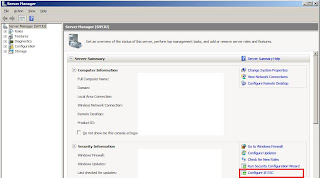
step2 : Turn Off the Security

Step 1 : Go To Server Manager

step2 : Turn Off the Security

Saturday, July 25, 2009
OWSSVR.DLL IN MOSS 2007
OWSSVR.DLL is used in SharePoint Designer for FP-RPC (Front Page – Remote Procedure Call).Now its getting depricated in each release.
Following are some of dpecricating OLD DLL usage.
1. Returning all data for a SharePoint list, including its XSD - http://[localhost]/_vti_bin/owssvr.dll?Cmd=Display&List={ListGuid}&Query=*&XMLDATA=TRUE
2.Rreturning data of SharePoint list based on a specific view from the list -http://[localhost]/_vti_bin/owssvr.dll?Cmd=Display&List={ListGuid}&View={ViewGuid}&XMLDATA=TRUE
3.Returning List definition - http://[localhost]/_vti_bin/owssvr.dll?Cmd=ExportList&List={ListGuid}
4. Retrieving ONET.XML - http://[localhost]/_vti_bin/owssvr.dll?Cmd=GetProjSchema
5. Retrieving field types - http://[localhost]/vti_bin/owssvr.dll?Cmd=GetProjSchema&SiteTemplate=fldtypes
OWSSVR.DLL workes based on httpget so you can use that in your javascript
<script>
function GetList()
{
// -- getting the filtered lookup
var reqstring = siteName + "/_vti_bin/owssvr.dll?CS=109&XMLDATA=1&RowLimit=0&List=" + lookupListName + "&View=" + lookupViewName;
var req = new ActiveXObject("MSXML2.XMLHTTP");
req.open("GET",reqstring,false);
req.send();
// -- loading response in XML Document
var doc = new ActiveXObject("MSXML2.DOMDocument");
doc.loadXML(req.responseText);
var data = doc.documentElement.childNodes(1);
for (i=0;i<data.childnodes.length;i++)
{
}
}
</script>
Following are some of dpecricating OLD DLL usage.
1. Returning all data for a SharePoint list, including its XSD - http://[localhost]/_vti_bin/owssvr.dll?Cmd=Display&List={ListGuid}&Query=*&XMLDATA=TRUE
2.Rreturning data of SharePoint list based on a specific view from the list -http://[localhost]/_vti_bin/owssvr.dll?Cmd=Display&List={ListGuid}&View={ViewGuid}&XMLDATA=TRUE
3.Returning List definition - http://[localhost]/_vti_bin/owssvr.dll?Cmd=ExportList&List={ListGuid}
4. Retrieving ONET.XML - http://[localhost]/_vti_bin/owssvr.dll?Cmd=GetProjSchema
5. Retrieving field types - http://[localhost]/vti_bin/owssvr.dll?Cmd=GetProjSchema&SiteTemplate=fldtypes
OWSSVR.DLL workes based on httpget so you can use that in your javascript
<script>
function GetList()
{
// -- getting the filtered lookup
var reqstring = siteName + "/_vti_bin/owssvr.dll?CS=109&XMLDATA=1&RowLimit=0&List=" + lookupListName + "&View=" + lookupViewName;
var req = new ActiveXObject("MSXML2.XMLHTTP");
req.open("GET",reqstring,false);
req.send();
// -- loading response in XML Document
var doc = new ActiveXObject("MSXML2.DOMDocument");
doc.loadXML(req.responseText);
var data = doc.documentElement.childNodes(1);
for (i=0;i<data.childnodes.length;i++)
{
}
}
</script>
Subscribe to:
Posts (Atom)